

Command: Alignment(s)
Guidelines > Character Information > Alignment(s)
Main Info
|Alignment(s) command is the 10th command under the character's Character Information section.
Command | |Alignment(s) |
|---|---|
Meaning: | the character’s moral/ethical values |
Note: | It is used to describe the character’s moral and/or ethical outlook on life, the universe, and everything else. |
Options: | Anti-Hero / Anti-Villain / Chaotic Good / Neutral Good / Lawful Good / Chaotic Neutral / True Neutral / Lawful Neutral / Chaotic Evil / Neutral Evil / Lawful Evil https://characterprofile.fandom.com/wiki/Character_Alignment |
Examples
Click on the image to open it in full view.
Standard Title | |
|---|---|
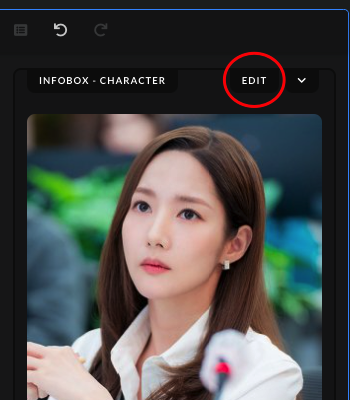 | After uploading the character's image, click on the "Edit" button found in the Infobox section. |
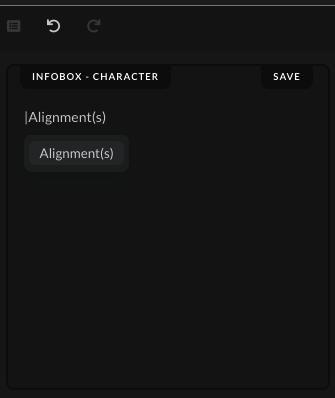 | Type the command | and write the command name, "Alignment(s)", then either press Enter on your keyboard or choose and click the command from the drop-down list to save the command. |
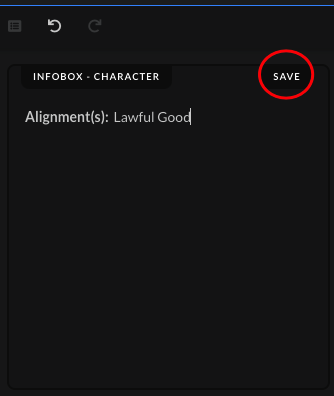 | Write out the character's alignment(s), using one of the options given above. Afterwards, click on the "Save" button after you've added the character's alignment(s). |
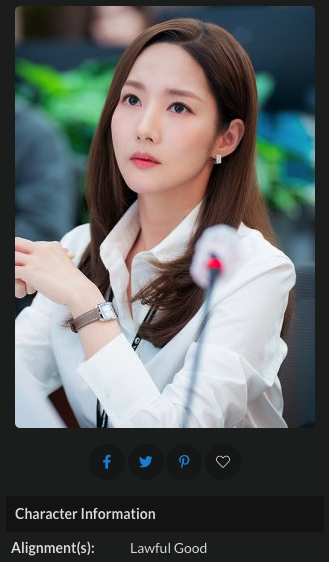 | When the submission gets accepted, the alignment(s) in the character's page should show up in the "Character Information" section. |


