Quantcast
Ji-N:
Indie Art Girl:

I used to be able to get my lines close together on a list but now they are spaced further apart like below.

You have to link me, because i cannot test from image.

https://kisskh.at/discussions/general-asia-forum/147242-2026-52-week-drama-challenge?pid=3450090&page=1#p3450090

Are you referring to this? This functionality we haven't changed. It should be the same regardless of the editor.

MARCH

MARCH

MuTeLuv: Love Me if You Swear

Unfollow

Fourever You Pt 2: Beside the Sky

A Girl & Her Guard Dog

Boyfriend on Demand

Spirit Fingers

Too Close Friend

Our Universe

Love Story in the 1970s

Countdown to Yes

Love After Addiction

MuTeLuv: Love Me if You Swear
Unfollow
Fourever You Pt 2: Beside the Sky
A Girl & Her Guard Dog
Boyfriend on Demand
Spirit Fingers
Too Close Friend
Our Universe
Love Story in the 1970s
Countdown to Yes
Love After Addiction

Ji-N:

Are you referring to this? This functionality we haven't changed. It should be the same regardless of the editor.

MARCH

MARCH

MuTeLuv: Love Me if You Swear

Unfollow

Fourever You Pt 2: Beside the Sky

A Girl & Her Guard Dog

Boyfriend on Demand

Spirit Fingers

Too Close Friend

Our Universe

Love Story in the 1970s

Countdown to Yes

Love After Addiction

MuTeLuv: Love Me if You Swear
Unfollow
Fourever You Pt 2: Beside the Sky
A Girl & Her Guard Dog
Boyfriend on Demand
Spirit Fingers
Too Close Friend
Our Universe
Love Story in the 1970s
Countdown to Yes
Love After Addiction

Yes. How did you get the sentences closer together? It was like that but not since yesterday.

Press Shift+Enter instead of Enter.

Ji-N:

Press Shift+Enter instead of Enter.

Ok. I'll have to re-enter (type) every title for it to work that way. The changes reset what I had in place and it doesn't seem to work to go back and fix what's already there using the editor in the same way.

There is definitely a difference and maybe it was a work around that made it work before, but now after I highlight my text the paragraph tool doesn't do a thing. Oh well. That was my work around, lol.

Thanks! I hope it doesn't do the same for my profile page, yikes!

You can test how the old editor work in your profile settings https://kisskh.at/account/profile

Ji-N:

You can test how the old editor work in your profile settings https://kisskh.at/account/profile

Sure, but isn't it going to change too?

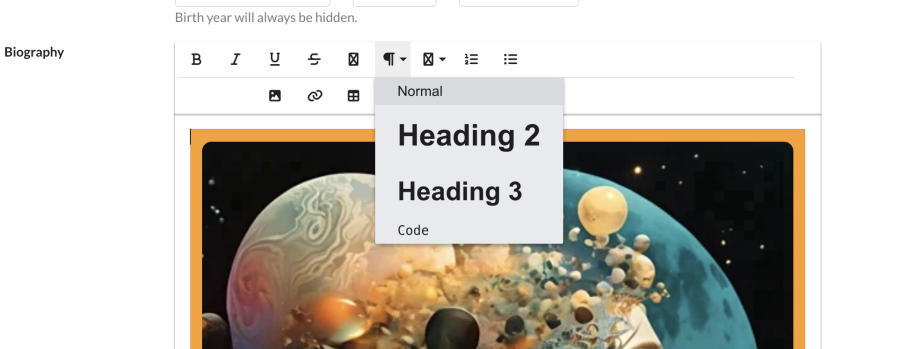
Here's the drop down with options. I must be doing smth wrong in the updated editor or it's not making sense to me.

I'll keep trying, but tomorrow. It's getting late in my timezone and my brain is getting frustrated. 😊

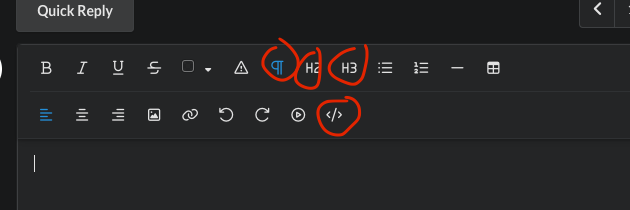
What I mean is that you can test to see if there’s any difference when you edit between them. They are now outside instead of in the dropdown.

Ji-N:

Press Shift+Enter instead of Enter.

Thank you so much for the tips.

@Ji-N

Hi, I have another question. When I edit my tables, I can see the columns and table lines, but I'm not able to adjust the column widths.

So usually, I could click on the line between the two columns and drag it to make the column wider/narrower, but it doesn't seem to work for me anymore. Is there another way to adjust them now?

E.g. here:

https://kisskh.at/discussions/general-asia-forum/136682-ost-watch-challenge?pid=3453292&page=2#p3453292

The tables for category 1, 2 & 3 are how I want them. But for the rest, I can't adjust them, so the images appear overly huge :(

Also, I can't hyperlink images anymore. I actually inserted the link for the MDL site for all dramas where I used an image. But when I click on them, it doesn't redirect me to their webpages.


let me look into the issue

I'm back this morning. I don't think I can explain clearly what the issue is so I'd rather drop it. Whatever it is, so be it.

It seems like there's more to work out, so I'll just wait for now.

Thank you for your time! I appreciate it!

an example for me: https://kisskh.at/discussions/general-asia-forum/126901-the-mdl-exploration-challenge?pid=3267316&page=3#p3267316

i didn't notice before i edited one minor thing from my post, but then i saved and it removed all the colors and as you can see the formatting is crazy looking now. different posters are differing sizes, all the wording is off center when it was centered, etc. as others have pointed out, when i reopen the post to edit and try to fix, it looks fine in the editor.

sone:

an example for me: https://kisskh.at/discussions/general-asia-forum/126901-the-mdl-exploration-challenge?pid=3267316&page=3#p3267316

i didn't notice before i edited one minor thing from my post, but then i saved and it removed all the colors and as you can see the formatting is crazy looking now. different posters are differing sizes, all the wording is off center when it was centered, etc. as others have pointed out, when i reopen the post to edit and try to fix, it looks fine in the editor.

We would need previous version to see what is the issue.

no 1 dou zhao defender:
The tables for category 1, 2 & 3 are how I want them. But for the rest, I can't adjust them, so the images appear overly huge :(

Updated.

no 1 dou zhao defender:
Also, I can't hyperlink images anymore. I actually inserted the link for the MDL site for all dramas where I used an image. But when I click on them, it doesn't redirect me to their webpages.

Will look into this.