Quantcast
Indie Art Girl:
I'll have to re-enter (type) every title for it to work that way.

You don't need to retype the titles. You only need to delete the breaks and then shift-enter.

Starting with this

Title 1

Title 2

****

becomes

Title 1Title 2

****

and then shift-enter the new break which gives

Title 1
Title 2

I forget to shift-enter all the time and fix it this way.

Please wait the next update for images related issue.

Hi I am having issues adding links and renaming them on posts. The link option just lets you enter a url and then as far as I can tell doesn't do anything... Previous version had enter link and enter link name option. Please advise.

HaveNoJams:

Hi I am having issues adding links and renaming them on posts. The link option just lets you enter a url and then as far as I can tell doesn't do anything... Previous version had enter link and enter link name option. Please advise.

We’ll add that back soon. For now, you can write something first, then select it and click add link.

Ji-N:
HaveNoJams:

Hi I am having issues adding links and renaming them on posts. The link option just lets you enter a url and then as far as I can tell doesn't do anything... Previous version had enter link and enter link name option. Please advise.

We’ll add that back soon. For now, you can write something first, then select it and click add link.

I tried as you instructed and it worked. Though, it was more straightforward how it had been in the past. Glad to hear it's switching back.

HaveNoJams:

I tried as you instructed and it worked. Though, it was more straightforward how it had been in the past. Glad to hear it's switching back.

We updated it already.

Ji-N:
HaveNoJams:

I tried as you instructed and it worked. Though, it was more straightforward how it had been in the past. Glad to hear it's switching back.

We updated it already.

Great.

Actually, I just checked another feature, would it be possible to remove the paragraph option?? Or at least make it where someone can deselect it?

Paragraph is the default, and each line is treated as a paragraph, so you don’t need to do anything. If you remove it, you won’t be able to switch back from Header or Code to Paragraph. It is the exact same feature as the old one, you can check the old editor in the profile settings.

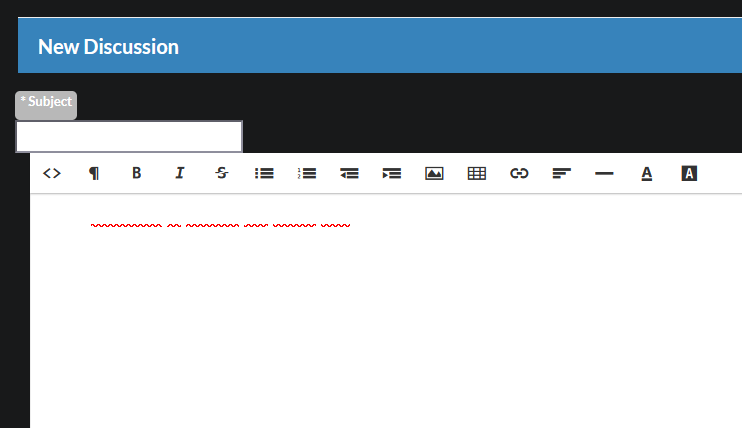
Hi - somewhat related (and maybe you're already aware of this) - the new editor in the Discussions section isn't dark mode friendly. It shows a white text box and the text is white, so you can't see what you're typing unless you switch to light mode. (You can see the squiggly lines where I deliberately misspelled to get the squiggly to show up...)

image.png

jaxca:
the new editor in the Discussions section isn't dark mode friendly

It's fine for me on Vivaldi and a Firefox fork. Just throwing in my data point in case it helps figure out the problem. Good luck.

Good point - I should probably note I'm on latest version of Firefox for Windows.

jaxca:

Hi - somewhat related (and maybe you're already aware of this) - the new editor in the Discussions section isn't dark mode friendly. It shows a white text box and the text is white, so you can't see what you're typing unless you switch to light mode. (You can see the squiggly lines where I deliberately misspelled to get the squiggly to show up...)

image.png

Hmm that’s not new editor. Ofd

Ji-N:

Hmm that’s not new editor. Ofd

Oops. Sorry, I thought it was related. The Discussions section used to work fine. I also just tried it on Chrome and it's doing the same thing (white text on white background while in Dark Mode).

How do you get there?

Ji-N:

How do you get there?

On any show's page, scroll down to Recent Discussions then the "New Topic" link on the upper right:
image.png
It works properly if responding to an existing discussion. It's only when trying to start a new topic that it does the white text+white background. Thanks!